
If your submission form is lengthy you can group your questions in tabbed sections. 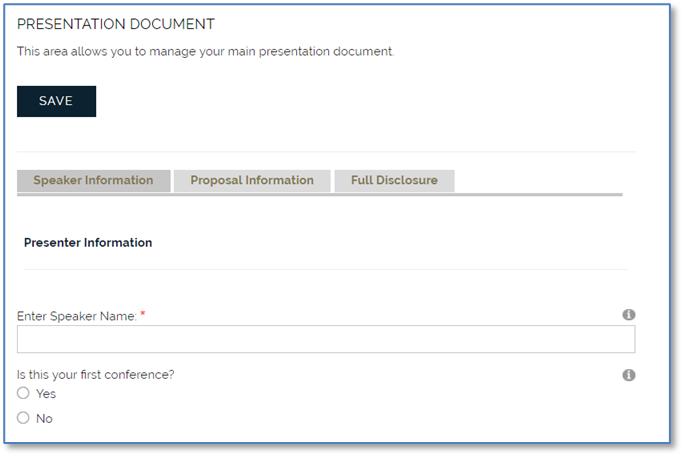
This is done by adding information about the tabs to the Repository Attributes dictionary. Select the Dictionary from the Repository section for the AMS Menu. Expand the Repository Attributes area and expand the Repository area.
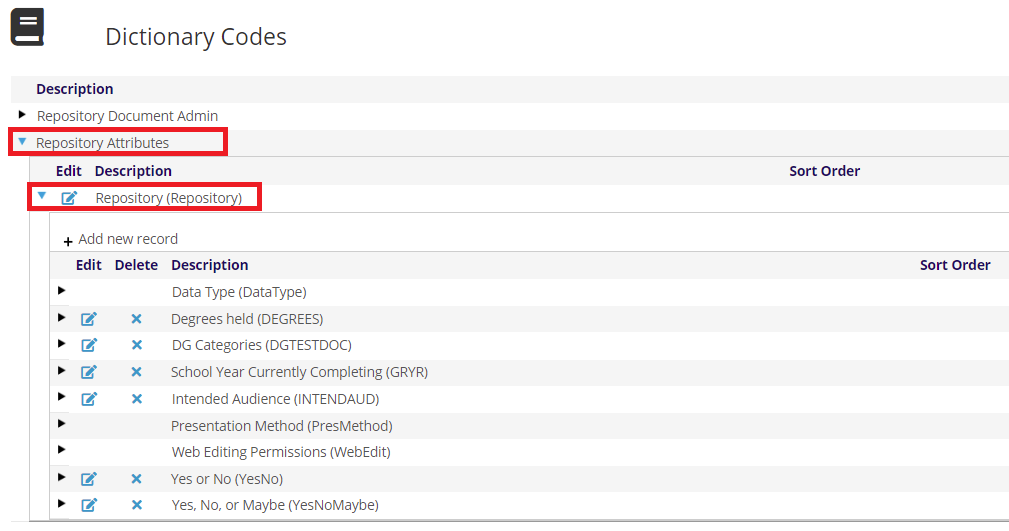
Click on + Add new record to add a new list. For the GroupCode, enter the Document Type for your form (2018CFA).
The Description should describe what we are doing, for example Tabs for 2018CFA. There are no Instructions and Sort Order is optional. By default, the lists are ordered alphabetically by GroupCode.
Click Save.
Expand the group you just created and click on + Add new record to add tabs.
For the MasterCode, enter up to ten characters that define the purpose of the tab, for example SPKR. The Description will be the wording on the tab, for example Speaker Information. There are no instructions. Because the tab order will naturally sort by MasterCode you must add a sort order to maintain the order you want.
Click Save.
Now we will add two more tabs. Click on + Add new record to add a new tab.
For the MasterCode, enter up to ten characters that define the purpose of the tab (PROP). The Description will be the wording on the tab (Proposal Information). Add a sort order to maintain the order you want (10).
Click Save.
Click on + Add new record to add a new tab.
For the MasterCode, enter up to ten characters that define the purpose of the tab (DISCLOSE). The Description will be the wording on the tab (Full Disclosure). Add a sort order to maintain the order you want. (15)
Click Save.
Now you will need to return to your original Document Data form and edit each question so you can select the appropriate Metadata Group, in our example, SPKR, PROP or DISCLOSE. All of your questions should now have an entry in the Metadata portion of the grid.