
Because your AMS user is tied to a contact record, when you load the Conference Module for editing, it can take a significant amount of time for the editing page to load as information about your contact is loaded in for all the variations of the module.
As a work-around, when you need to edit the settings of the Conference Module, you can create a new user that is not tied to a contact, but has the Administrators role and can edit modules in DNN.
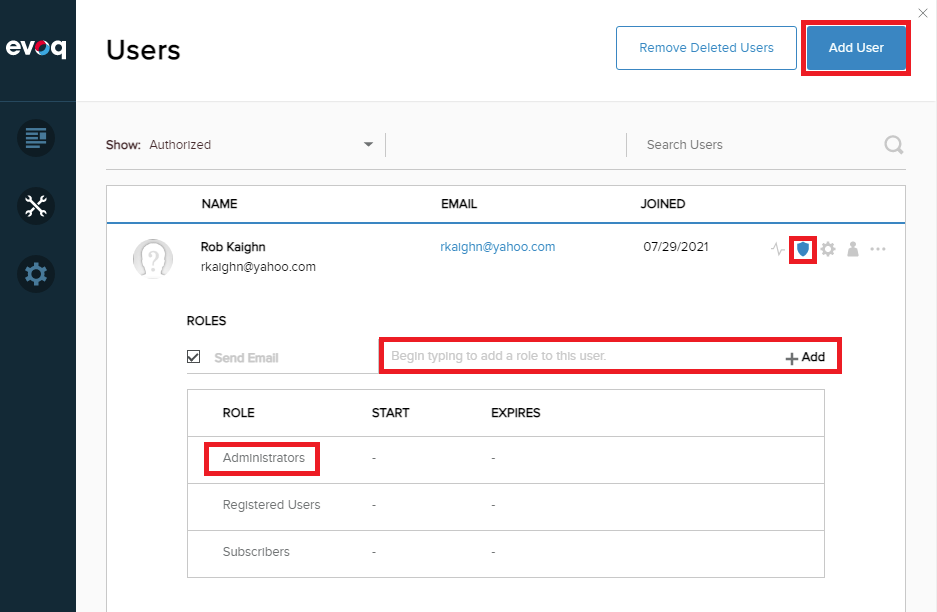
To add a new user in DNN, you must login to your DNN website as an Administrator. Then you will see the black admin menu on the left. Hover over Manage (the wrenches icon), and choose Users to open the Users screen, and click the Add User button at the top. Fill in the Name, User Name, and Password fields for the new user, and click Save at the bottom. Next, in the row with the new user, click on the shield icon to edit this user's roles. Type in Administrators, and then click + Add to add this role to the user.
Now when this user logs in, they will be able to edit pages, including those with the Conference Module, and that should load quickly.
NOTE: this user will have administrative access to your site, so be careful who you allow to use it. Also, because this user is not connected to a AMS user, it will not be able to do any AMS related functions, like register, view its profile, make purchases, and so on.