
No matter what type of reviewer function you need, it all starts with creating and building an electronic Reviewer Document for the reviewer(s) to answer. The process for creating a reviewer document is very similar to the one used to create submission documents, as described in an earlier section of this chapter.
First check the Reviewer Document grid to make sure the option to clone and edit an existing document isn’t the best choice. The grid includes columns for Document Type and Document Type Description that are the same as those of the corresponding submission document, in order to avoid any confusion. 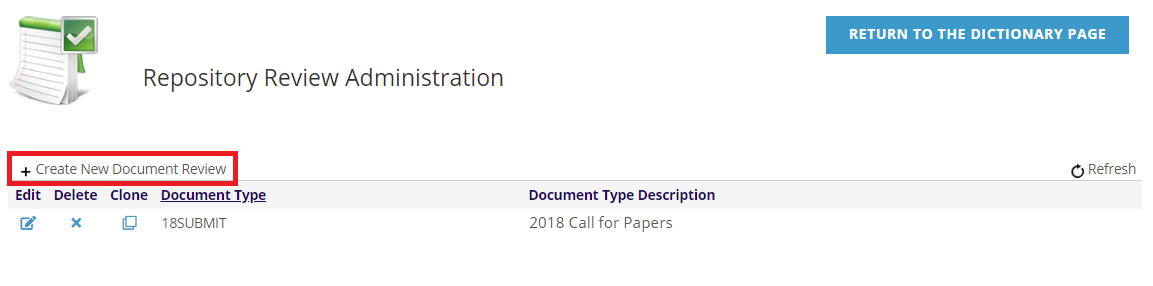
To create a new reviewer document, click on +Create New Document Review from the Reviewer Document grid. The following screen will load.

Use the drop down menu to select the required Document Type for This Review from the list of available submission documents. Note that the submission document has to have been created already in order for you to select it here. This will connect the review questions you create to the corresponding submission document. This will also determine which Document Type and its Document Type Description will populate the corresponding columns in the Reviewer Document grid. Once you have made your selection here, the Save Document Review button will activate, and you can click it once at least one Review Question has been added.
Once Review Questions have been created, they will appear in their grid in a similar fashion as the submission questions appear in submission documents.
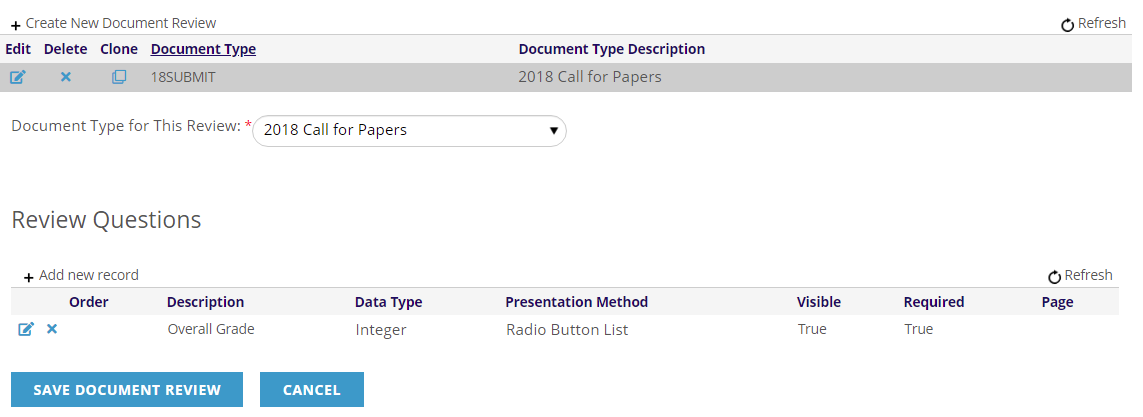
Once at least one Reviewer Question has been entered, click on the Save Document Review button to create and save the Reviewer Document in the AMS. You can continue to add to and edit the Review Questions going forward, but it’s recommended practice to save the full document after just the first question has been created because no questions will be saved until the entire reviewer document is saved.