Click on + Add new record in the Document Data section to add your first question.
Fill in the Document Data form and click the blue “Update” button.
Example Questions
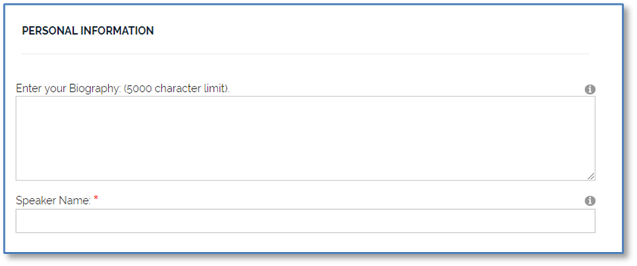
1. Bio: A large textbox with a limit of 5000 characters
Description: Bio
Sort Order: 5
Data Type: Large Plain Text
Presentation Method: Multi-Line Textbox
Textbox Max Char Limit: 5,000
Web Edit Permission: Author
Web Caption: Enter your Biography: (5000 character limit)
Web Tooltip Message(?): Enter your Biography: (5000 character limit)
No other changes made
2. Speaker Name: A regular textbox, required.
Description: Speaker
Sort Order: 10
Data Type: String
Presentation Method: Textbox
Web Edit Permission: Author
Web Caption: Speaker Name:
Web Tooltip Message(?): Speaker Name:
Web Required: checked
No other changes made
3. PERSONAL INFORMATION label: Label information to describe the following questions
Description: Personal Label
Sort Order: 1
Data Type: String
Presentation Method: Large Label
Web Edit Permission: Author
Web Caption: none (required but it can be any text)
Web Default: PERSONAL INFORMATION
No other changes made