
The primary function of Dictionaries is to populate many drop down lists and options in the AMS. Dictionaries consist of three tables that work together in a cascading hierarchy. The top level is called the GroupType, the middle level is called the GroupCode and the lowest level is called the MasterCode.
There are two types of Dictionaries: Group Tables and Flat Tables. Group Tables utilize all three levels and allow for grouping sets of values. Flat Tables utilize only two levels and are used for a simple list of values.
The GroupType is used to designate the name of the dictionary. The GroupCode is then used in Group tables to indicate each group of values. The MasterCode is always used for the values of the dictionary.
An example of a Group table is the Membership Dictionary. The GroupType is Member Dictionary, Groups could be Individual and Corporate, then the exact member types for each would be MasterCode values such as Professional or Student in the Individual group and Vendor or Manufacturer in the Corporate group.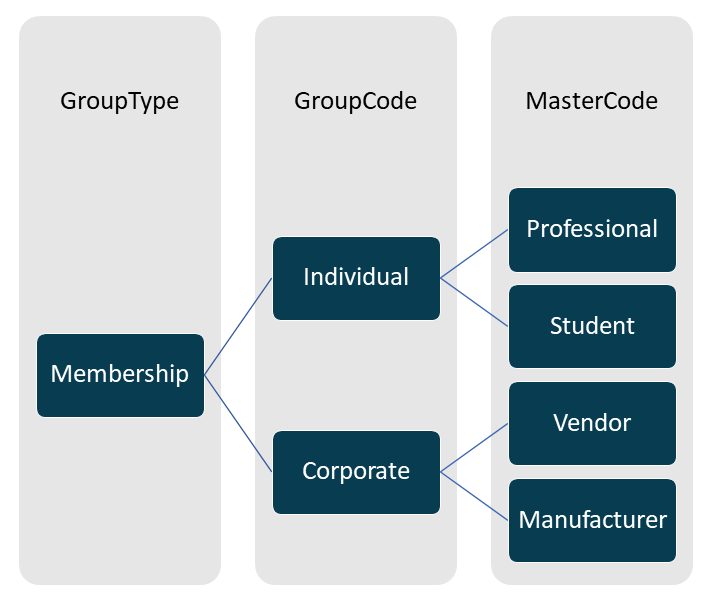
An example of a Flat table is the Address Types Dictionary. The GroupType is Address Types, the GroupCode level is skipped, and the types of addresses are the MasterCodes. Examples are Home and Work.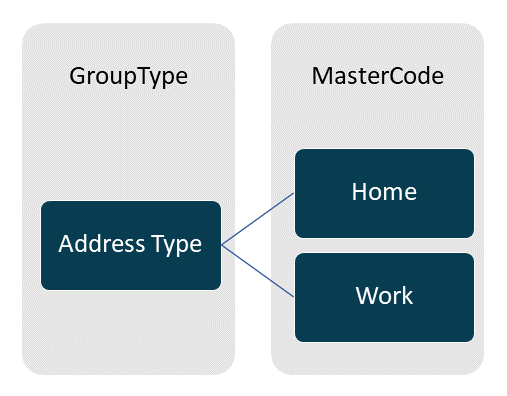
Each value for the GroupTypes, GroupCodes and MasterCodes is made up of a code and a description. The code is a maximum of 10 alpha-numeric characters that cannot be changed once created. The best practice is to use all capital letters, and to never use spaces or special characters. The description can be any text you want, and is what is displayed throughout the system. An example in the case of Address Types then might be a MasterCode of WORK, with a description of Work Address.
Instructions are special codes that can be added to dictionary entries, like CTRL=RBL when are related control should be set as a radio button list. The instruction codes (CTRL in this case) are almost always 4 characters. These individual instructions are entered with no spaces; single spaces are used between 2 different instructions, for example
CTRL=RBL MBRT=PERSONAL
where the Membership Type (MBRT) should be Personal. In the next example, colons are used to drill into SubTypes, and a pipe is used to add multiple values, for example
CTRL=RBL MBRT=PERSONAL:STU|PERSONAL:REG
More details are given elsewhere in this knowledge base about the specific use of Instructions in the related areas as they do vary.