
While the four previous buttons pertained to preparing for booth sales, these next three buttons pertain to functions that occur after the sale.
There are two ways, via website modules, to process how booths are selected for purchase.
Live Booth Sales
Live Booth sales allows an individual to purchase 1 or more booths and in this case the booths are automatically assigned to the purchasing company. However, booths can be changed after purchase using Edit Assignments.
Request Booth Sales
Request mode booth sales asks the purchaser to select up to four desired booths but does not assign any booths to the purchaser. Once most of the available booths have been purchased it is up to you to assign booths based on what could be many various factors, such as number of booths purchased, the requests of the company, or placement of rival companies.
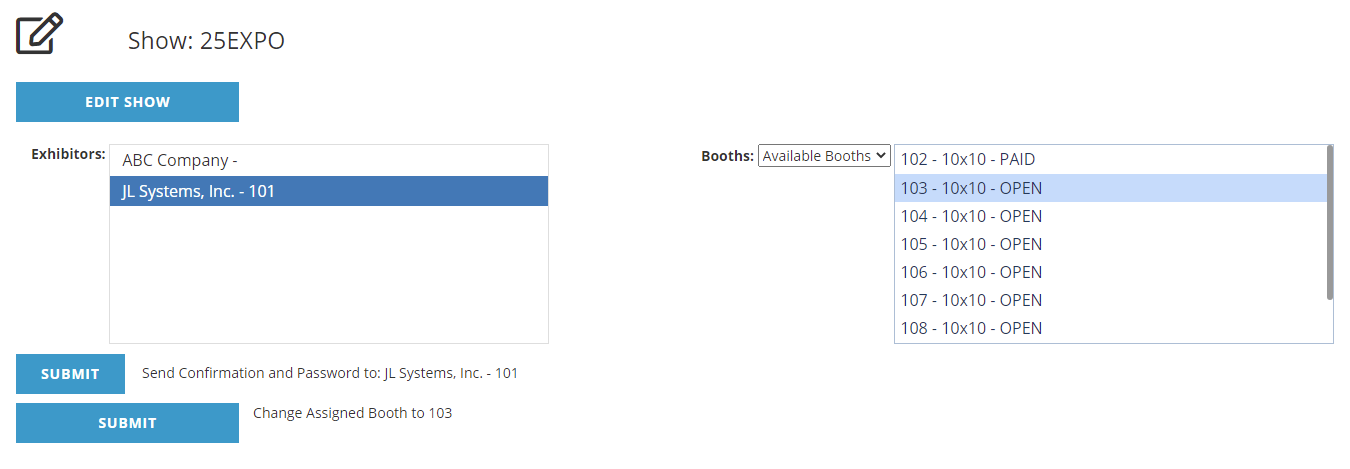
On the left side is a list of all exhibitors followed by the booth they have been assigned to. If there is no booth assigned yet, there will only be a dash. If you click on a company it will highlight and you will see a Submit button to send a confirmation and password in an email to that company. This pertains to the Exhibitor Portal (see below).
If you also click on a booth from the right column you will see the additional Submit button to change the assignment to the selected booth.
NOTE: If your exhibitors are not showing here, make sure your process has given them a Booths folder entry.
When trying to change booths, if you receive an error stating The financial record for this booth could not be located. The booth assignment has NOT been changed, make sure the company has a Booths folder entry for this show with a Primary Booth Assigned.
About the Exhibitor Portal
The Exhibitor Portal is a website module that allows the primary booth contact to manage aspects of the booth. These aspects may include the option to upload a logo, add a company bio and/or add booth personnel. The primary contact will log into the portal using the booth number and a password that has been assigned to them and sent to them via email.