
Inventory Item Quantities is where the amount of an item is set for various locations. To add a new location and its Quantities , click the + Add new record at the top left of the grid. To view or edit existing Quantities at a location, click the  edit icon on the left side of the grid next to the location you want to edit.
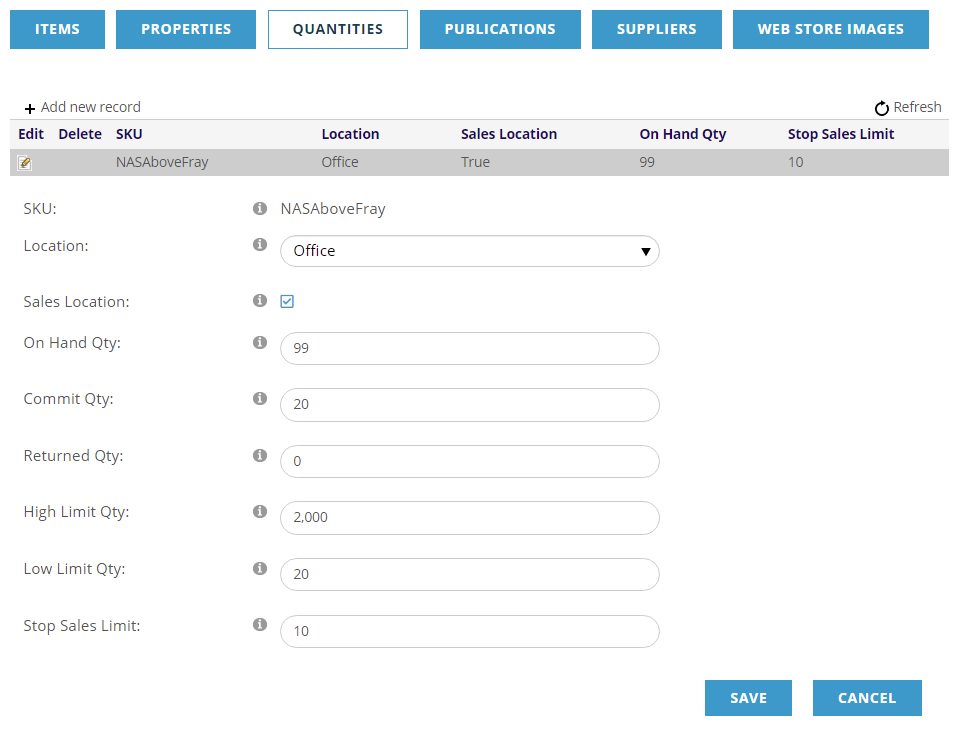
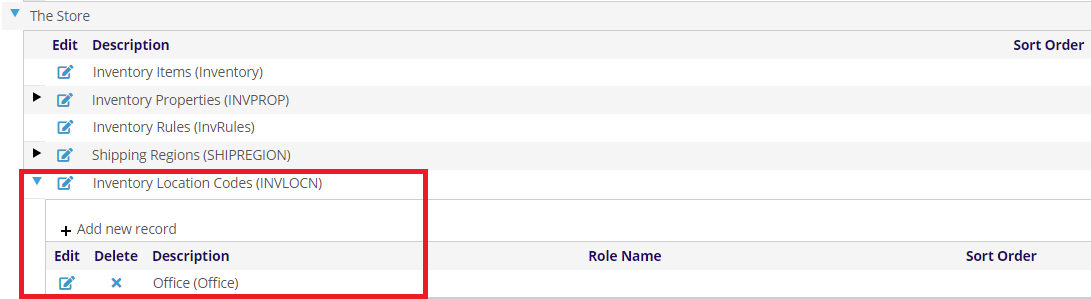
The Location drop-down allows you to select from the locations defined in the Dictionary under The Store, Inventory Location Codes (INVLOCN).
The Sales Location check box is used to set this location that the AMS is to use when selling the item.
The remainder of the fields are around quantities at this location
- On Hand Qty- the number of items available at this location.
- Commit Qty- used to track the amount of stock that is in the ‘pipeline’ but not yet ‘sold’. For example, has been placed in the shopping cart but the user has not checked out yet. Generally, you should not edit this field and leave a zero when setting up a SKU.
- Returned Qty- Number of items returned. Generally, you should not edit this field and leave a zero when setting up a SKU.
- High Limit Qty & Low Limit Qty- are high and low limits you want to keep for this product. These are used with the Physical Inventory Worksheet report to determine when you need to reorder.
- Stop Sales Limit- this is quantity to stop selling this item when reached.
If the On Hand Qty less the Commit Qty is zero, then an “Out of Stock” tag will be placed on the item. An out of stock item may still be selected for purchase but it will be backordered within the AMS.
When an item is placed in a shopping cart the smaller of the quantity on hand less the quantity committed OR the quantity ordered is placed in the quantity field of the shopping cart. In other words, if we can fill the order we will. But if the quantity available for sale is less than what the customer wants then all we can do is give them the quantity available.
Click SAVE to save your changes, or CANCEL, when you are done.