
Each saved inquiry is assigned to a Library Card that describes the question, identifies the author, and the date when it was created as well as when it was last used. A sample Library Card is seen in the next screen shot. 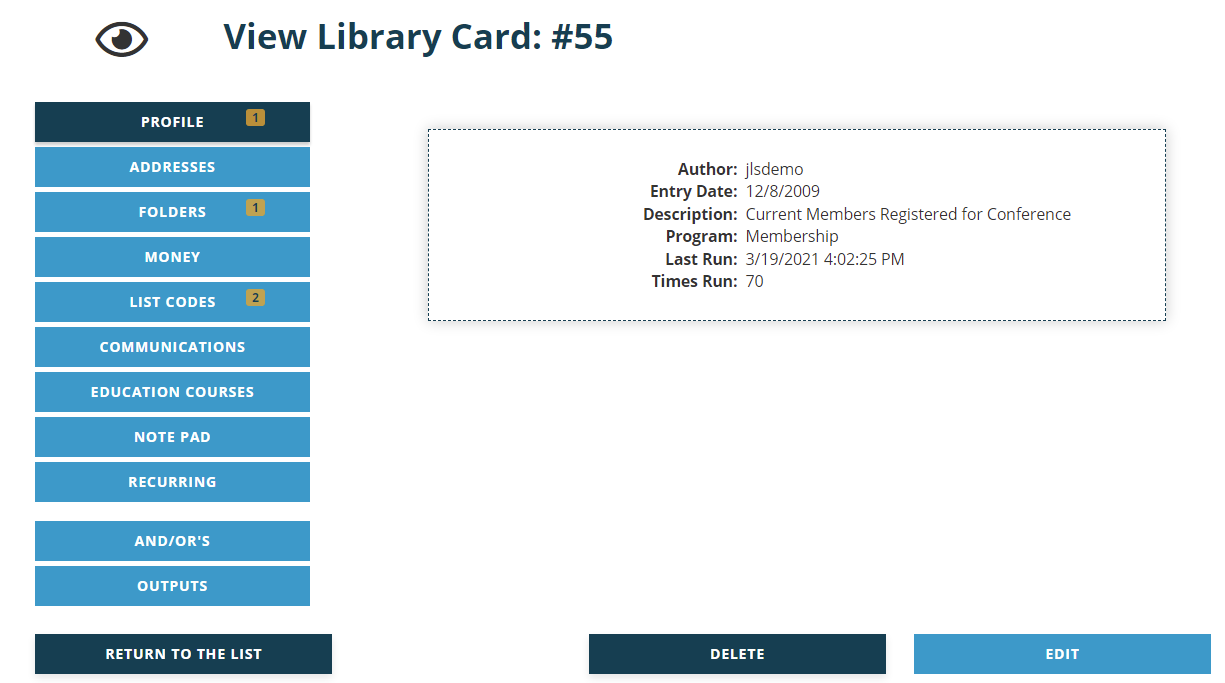
The Library Card ID number is at the top next to the “View Library Card:” header and needs to be used when contacting support for assistance on that card.
The Entry Date field is automatically filled to record the date the card was created.
The Author, Description and Program fields are described in the next section of this knowledge base.
The Last Run and Times Run fields are automatically filled to reflect the most recent date and time that someone ran the Library Card to pull data, and how many times it has been run since it was created.
All of these fields except Times Run flow through to the grid on the Library of Saved Inquiries page.
To make changes to this data in an existing Library Card, click on the Edit button, but note that this is not the path to editing the search criteria for the card. Card criteria are created and edited via the buttons to the left of the card and are covered later in this chapter.
To remove the card from the library, click on the Delete button.
To go back to the grid of Library Cards, click on the Return to the List button.