NOAH includes the ability to manage requests to unsubscribe to emails by directing the recipient to the opt in/out choices you have created via their online profile. There are multiple methods to choose from, and there is some configuration support staff must perform before you to begin using the unsubscribe features. If you wish to enable this functionality for use in your blast emails please Contact Support.
Once you have activated this functionality you can place an unsubscribe link at the bottom of an email body, as seen in the next screen shot. This will take the contact to a special page in your website for unsubscribing that does not require the person to log in. You can specify an Opt In/Out code to only display that category to the contact, or you can display the entire list of Opt In/Out options as is the case when they visit their profile.
In this case, our unsubscribe link has the text “Click here to unsubscribe from the ISAM News”.
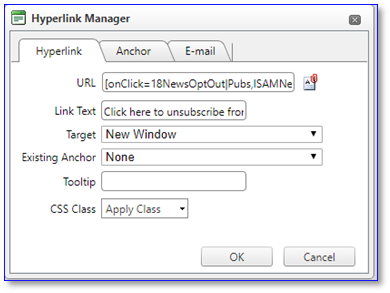
When you create the link, the URL must begin with the same pattern as all EmailTrack links, [onClick=1801NewsOptOut, where 1801NewsOptOut is the Emailtrack code setup to send the contact to the Opt In/Out page. The EmailTrack section in this chapter has more information on click codes. If you do wish to load all of the Opt In/Out choices then you do not need to enter anything else in the URL.
If you wish to specify a single Opt In/Out category that pertains to the subject of your email, in this case the ISAM News, there must be a “|” vertical bar (find it below the backspace key on your keyboard), followed by the Opt In/Out GroupCode, a comma (,), then the Opt In/Out MasterCode and finally the closing square bracket. For this example, the entire URL is: [onClick=13NewsOptOut|Pubs,ISAMNews], which specifies the Publication group of Opt In/Out choices, and the specific choice for ISAM News.
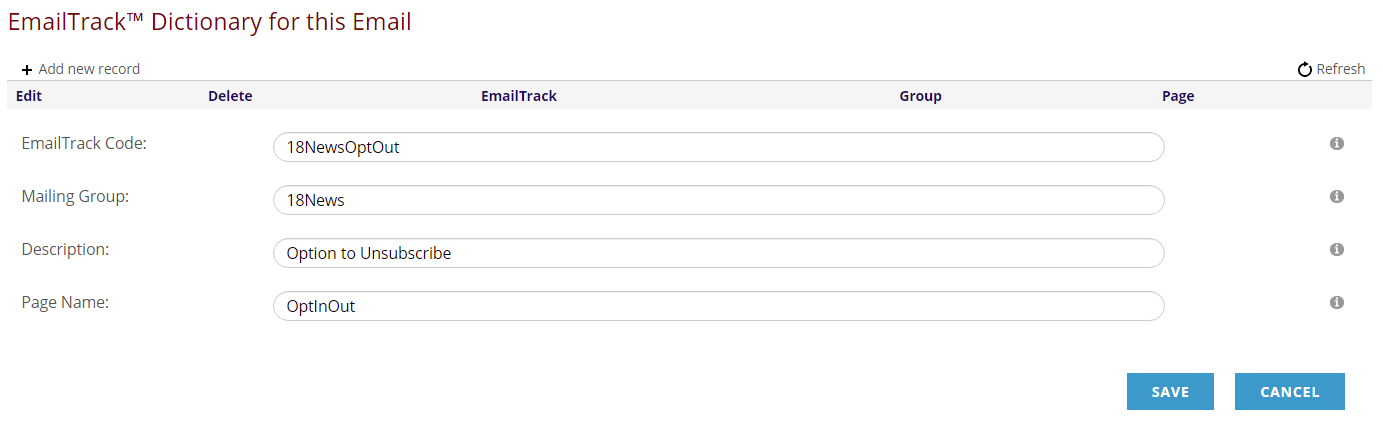
Be sure to add 18NewsOptOut to the EmailTrack Dictionary and save it. The Page Name is usually OptInOut but check to see what name is used for your site and enter it in that field.