
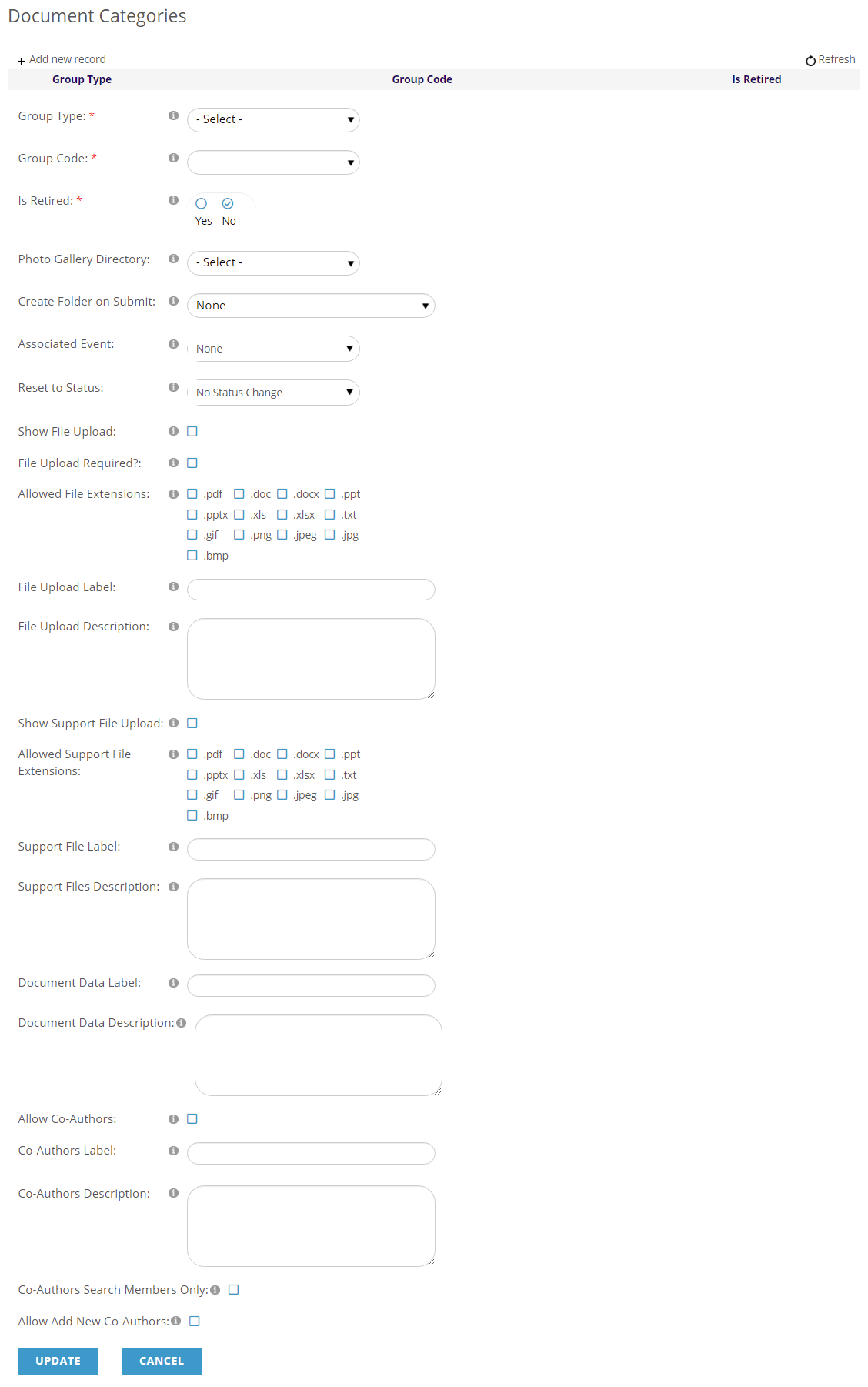
Group Type: Choose Repository Folder Document.
Group Code: Choose Presenter Center Folder Documents.
The Group Type and the Group Code are the only settings you need for use with Presenter Center.
Is Retired: This is preselected as “No” but can be changed to “Yes” to hide this record.
Photo Gallery Directory: Used to designate which portal directory to save uploaded images to. This is not used for Presenter Center.
Create Folder on Submit: Designates whether a folder will be created. This is not used for Presenter Center.
Associated Event: Designates an event to be associated with. This is not used for Presenter Center.
Reset to Status: Designates a status to switch to upon submitting. This is not used for Presenter Center.
Show File Upload: Used to indicate that a main file can be uploaded. This is not used for Presenter Center.
File Upload Required: Indicates whether the main file upload is required. This is not used for Presenter Center.
Override Allowed File Extensions: Here you can specify what kind of files can be uploaded. This is not used for Presenter Center.
File Upload Label: Designates a name for the main upload file. This is not used for Presenter Center.
File Upload Description: Designates a description for the main upload file. This is not used for Presenter Center.
Show Support File Upload: Used to indicate that support files can be uploaded. This is not used for Presenter Center.
Override Allowed Support File Extensions: Here you can specify what kind of files can be uploaded. This is not used for Presenter Center.
Support File Label: Designates a name for the support upload files. This is not used for Presenter Center.
Support Files Description: Designates a description for the support upload files. This is not used for Presenter Center.
Document Data Label: Designates a name for the Document Data. This is not used for Presenter Center.
Document Data Description: Designates a description for the Document Data. This is not used for Presenter Center.
Allow Co-Authors: Used to indicate whether Co-Authors can be added to presentations. This is not used for Presenter Center.
Co-Authors Label: Designates what Co-Authors will be referred to. This is not used for Presenter Center.
Co-Authors Description: Designates a description for Co-Authors. This is not used for Presenter Center.
Co-Authors Search Members Only: Used to indicate whether Co-Authors can be searched for by non-members. This is not used for Presenter Center.
Allow Add New Co-Authors: Used to indicate whether additional Co-Authors can be added to presentations. This is not used for Presenter Center.
Once the three parts of the Repository Document have some data you can click the Update button to save your work.
- Document Type and Document Type Description
- Document Data
- Is made up of the questions that will be asked in the form.
- There must be at least one item of Document Data (Question).
- Document Categories
- Is used to define requirements for uploading files.