
The Contact Reports control is used to run quick reports and exports for a single contact. While your selected report defaults to apply to the contact record you are on, you can select another one in all but two cases.
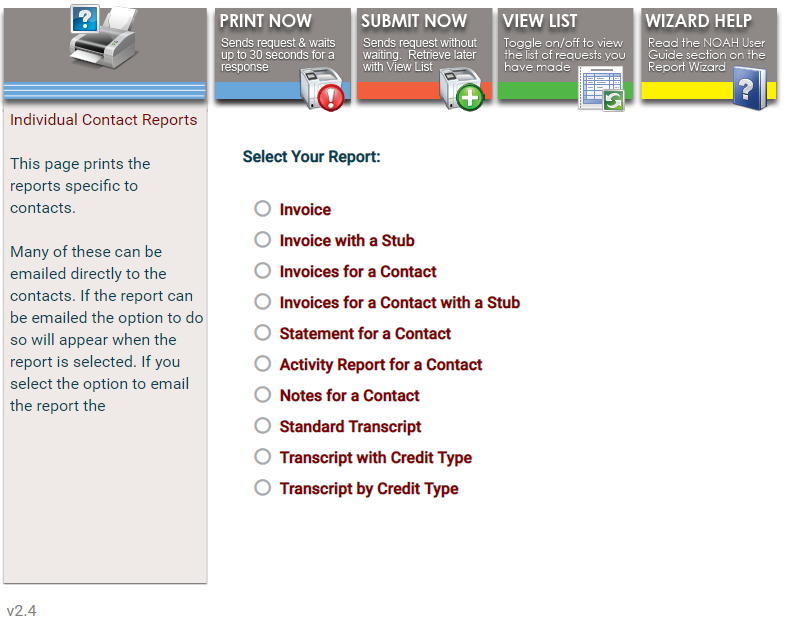 Selecting any of the reports invokes the parameters available for that report, in view below the report list. The following screen shot corresponds to the selection of Activity Report for a Contact.
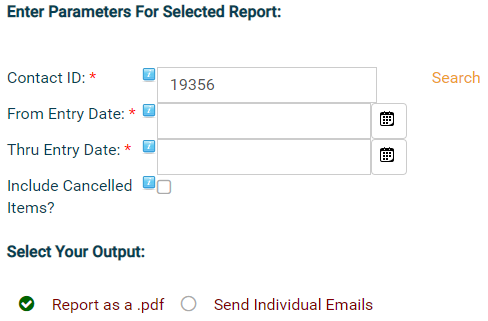
All reports except Invoice and Invoice with a Stub will allow you to switch the Contact ID by typing in a new one or clicking on the word Search to the right of that box. Some reports will allow you to enter a date range, as in this case. You can type in these dates manually or activate the calendar popup by clicking the calendar icon to the right of each box. Some reports will have choices to include or exclude certain parameters, as in the case above for cancelled items. Fields marked with an red asterisk (*) are mandatory.
The Invoice and Invoice with a Stub report options provide an Invoice Nr drop down field of invoices, with the most recent at the top of the list, that were generated for your currently selected contact record.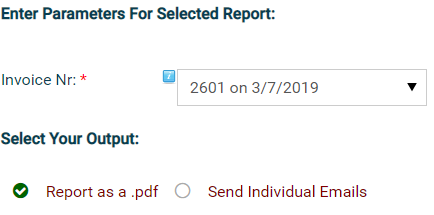
For all of these Contact Reports, you must choose one of two Output radio buttons to generate the report as a pdf or to send it to individual emails. Once you have made your selection here, use the controls at the top of the control to Print, Submit or View your report.
 To read more details about Library Reports and Exports, click on the Wizard Help control at the top right of the contact reports controls to open the Report Wizard section of this knowledge base.