
RSS Feeds are a great way to get information from one platform into another. For example, other CMS platforms can display an RSS Feed as a content item. Thus a feed of your events could be shown there, and anyone clicking on one of those events for more information would be take to your website where they could register.
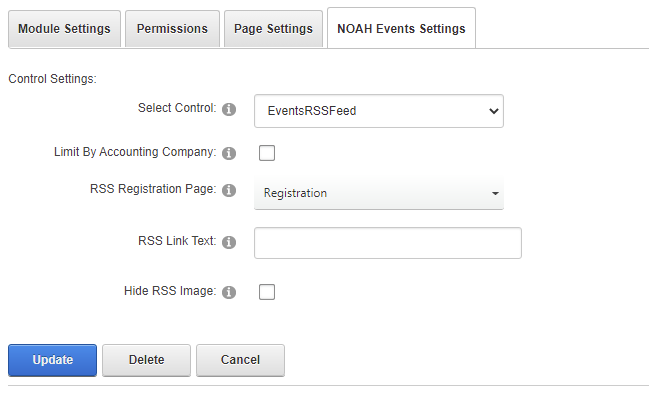
When using the NOAH Events module, selecting the control as EventsRSSFeed will produce a link to an RSS Feed.

Limit By Accounting Company is not related to this version of the control and should be left unchecked.
The other settings of the module allow you to set the RSS Registration Page (where to register), and to change the RSS Link Text from the default of RSS Feed. There is also a check box to Hide RSS Image, which is the orange icon displayed after the link.
The RSS feed will contain your upcoming events and will include the
- Event Title
- Event Description- the event Start Date followed by the event's Synopsis
- Event Link- a link to the event.
- Publication Date- the event Start Date (some RSS readers sort by this date)
- Event Start Date- the event Start Date
- Event End Date- the event End Date
- Event Type- the Event Type & SubType
- Event Location