
The AMS is able to collect state sales tax, if configured correctly. This is typically done for Inventoried Items and the tax is charged based on the Ship To address. If other sales tax requirements are needed, please contact support.
There are several settings that are used to collect state sales tax:
- The System Settings area has a Sales Tax Calculation options that should be set to STATE.
- Program Codes must have the Taxable flag checked to be included in the sales tax calculation.
- For the Invoice, the selected Bill To Contact must not have the Tax Exempt? flag checked, and the selected Ship To address must be in the state where tax is to be collected.
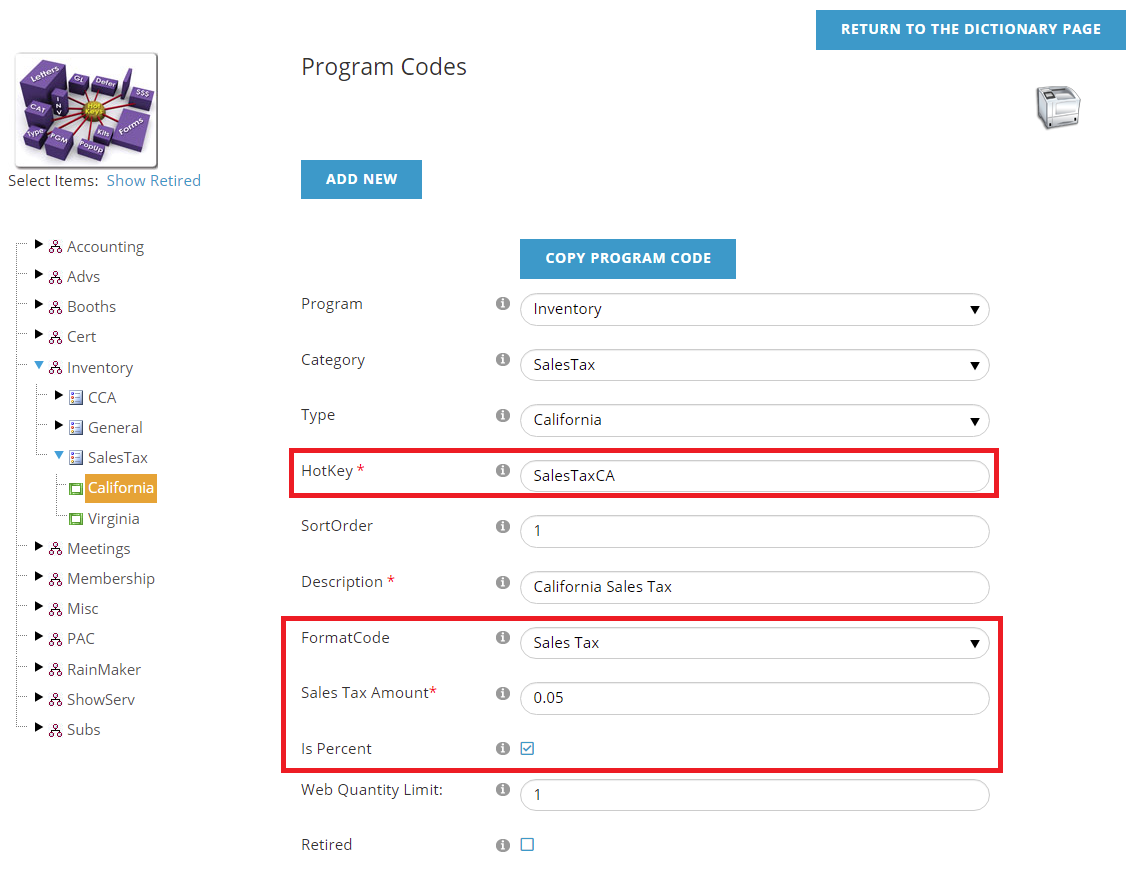
- A Program Code must exist for each state where sales tax is to be collected. This HotKey should be named SalesTax with the 2 letter state abbreviation. So for California (CA), it would be SalesTaxCA.
When creating the Program Code(s) for the state sales tax, use the Format Code for Sales Tax. Normally, the Is Percent field will be checked and the Sales Tax Amount entered is then the percentage collected. So if you needed to collect a 5% tax rate for given state, you would check the Is Percent field and enter 0.05 in the Sales Tax Amount field.
When setup correctly, the sales tax HotKey will automatically be added to added to the cart.

This will work outside of the USA, as it is based on the 2-letter state code. For example, Ontario (ON), Canada would follow the same steps above, with the HotKey named SalesTaxON.