
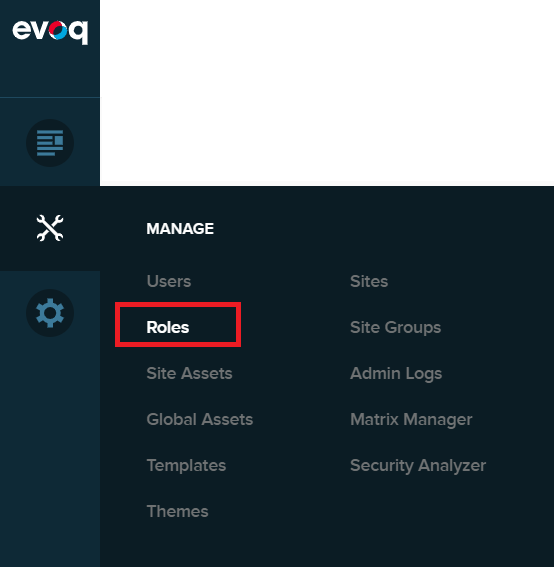
Adding new roles is, for the most part, easy. First you must login to your DNN website as an Administrator. Then you will see the black admin menu on the left. Hover over Manage (the wrenches icon), and choose Roles to open the Roles screen.
Next click the Create New Role button.
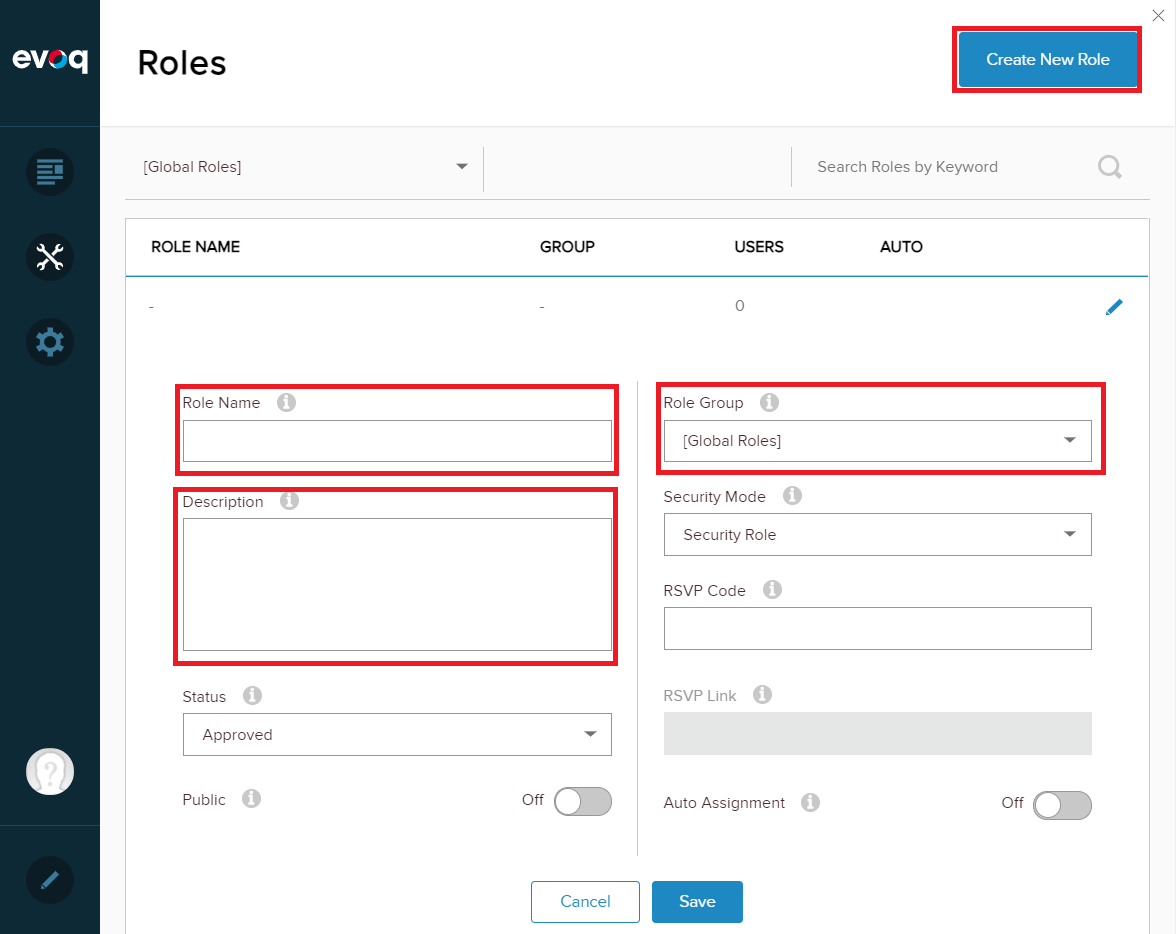
Now give your new role a Role Name. Next, we recommend that you add Role Groups to group all your roles using an easily identifiable name. An association can have dozens of role groups that contains hundreds of roles across all the role groups. It’s much easier to change the role group and only see roles within that group then attempting to see every single role under All Groups. You may also optionally add a Description to help further define this role.
Do not assign roles to users in DNN. If you assign them in DNN, when the contact logs in, their roles will be refreshed from the AMS, and since this role does not exist in the AMS it will be removed from their record in DNN.
Roles should be assigned in the AMS after you add the role to the code, then add the program or list code to the contact in the AMS. After that is completed, that user will be able to login to the website and access the pages or documents that their role is set to.
This will work for MasterCodes associated with Folders (i.e. Membership and Committees), List Codes, and Program Codes. MasterCodes related to Folders will also have the associated end date associated with the role, so when the membership or committee assignment is over, the associated role is terminated. This is not true for Program Codes and List Codes, once automatically added, those need to be removed from the contact for them to be removed from the associated role. Also, Folders can be used to grant roles to the Owner of the Folder, but these roles will not be granted a Linked Contact on the Folder. Roles tied to an organization's Membership folder are granted to those who have current Work folders with the organization.
For example, within the Member Dictionary in the AMS, you could potentially have a Board Chair position. You could create that role in DNN, then in the dictionary of the AMS, set the Board Chair position to have a Role Name of the same name you created in DNN. Then you could create pages on your website that only allowed that role access the page(s) on your website.
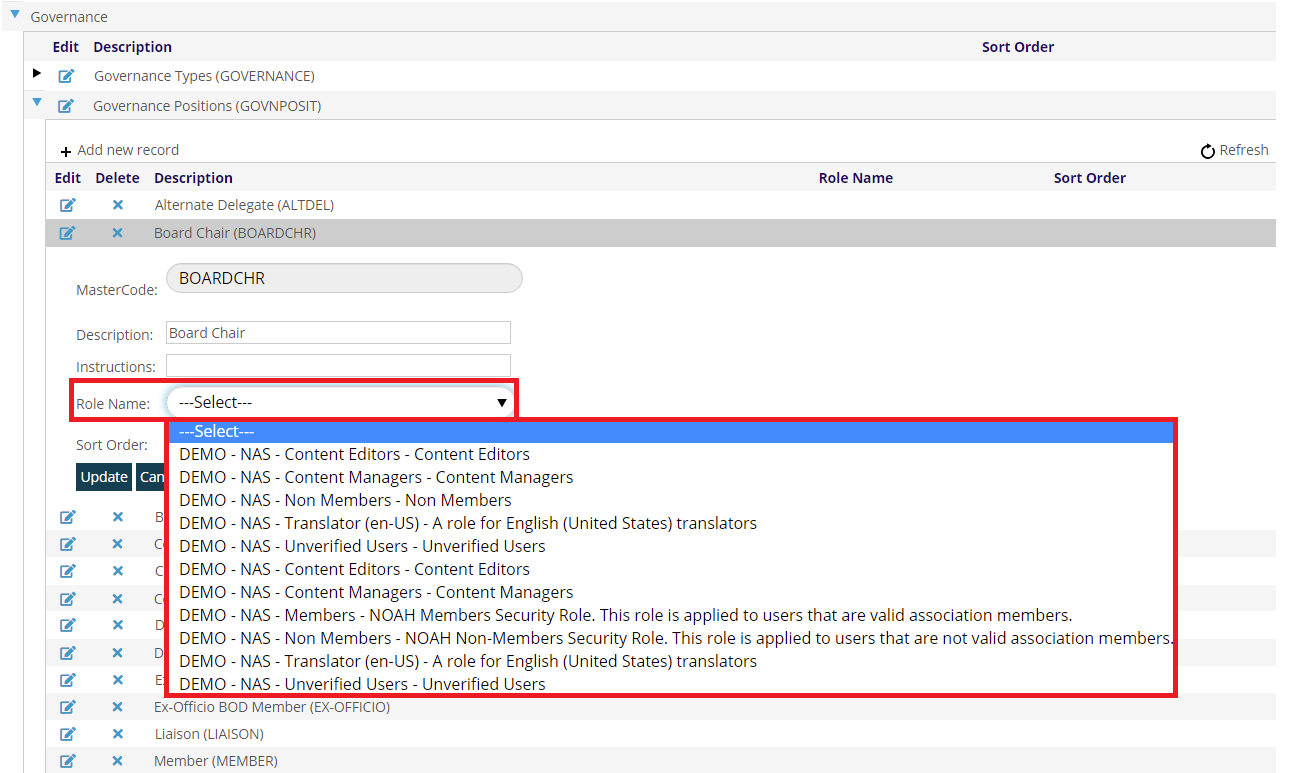
The Role Name in the drop down will be a combination of the Client name, Accounting Company, plus the Role and Description from DNN.
After you finished creating the MasterCode attached to a role, go to the contacts’ record and add the Governance to their folder or if the contact already has the Governance Type in their folder, then you will not need to do anything.
Back in DNN, set the page to have the role that was created and attached to the Governance Type and any users that have the folder, will be able to access that page on your website.
For Member Types, each related MasterCode can be tied to a Role on your website. However, if you have separate roles for each member type, you will need to add all the roles to content that you want to allow all members to access. In contrast, if each of your Member Types gets the same role, then you only need to add that role to website content to grant all members access to it.
Roles can also work with Program Codes. Towards the bottom of the Program Code screen there is an option for Role Id where you can also select an existing DNN role to assign to a contact when they purchase this Program Code. NOTE: this only gives them the role in DNN when purchased, and there is no functionality to later remove those who have purchased this Program Code.
A user's roles are refreshed from the AMS when they login to the website, so if a contact has not logged in, they will not be a part of any applicable role you have created. Thus when viewing counts of role users in DNN, only those that have logged in and are in the role are shown, not all contacts who qualify for the role in the AMS.
When you impersonate a user using BecomeUser, their roles will be refreshed. This allows you to quickly see that everything is set correctly for a new role.