
On a NOAH website, Administrators (and those with access to the page) can become, or impersonate, another user. When logged in as an Administrator, go to the BecomeUser page- https://yourNOAHwebsite.org/BecomeUser.
At the top, you will see a link to open a Search Contacts dialog where you can find the user that you would like to become. 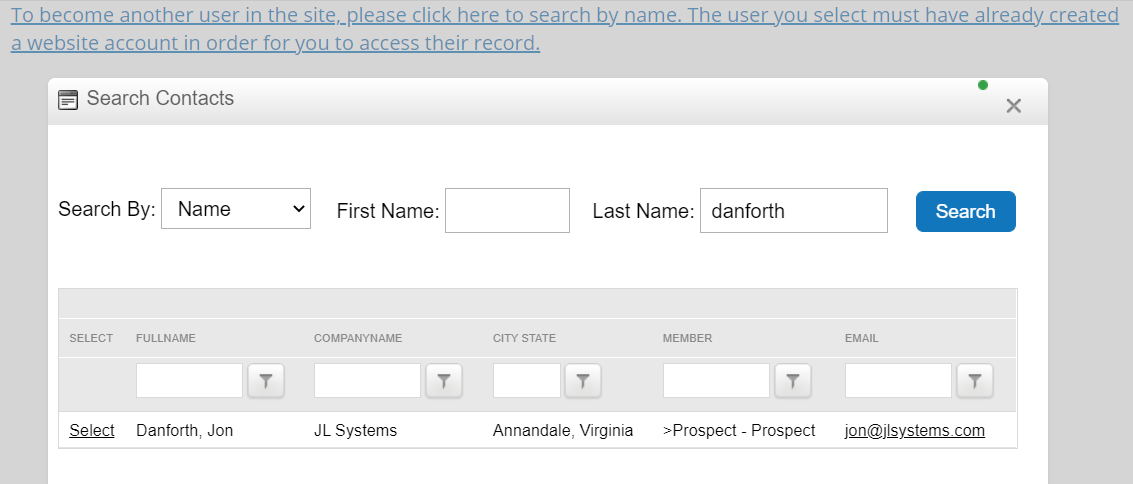
Choosing Select next to the user in the grid logs you out and in as that user. NOTE: The user must have an account to login on the website, if you pick a user who does not, you will get a warning message and not be logged in as them.
Every action you now take, you are taking as that user, so you can try and replicate any issues. Please note that you are really logged in as that user, so anything you do is actually done as that user, so please be careful. This also refreshes any roles that user has in the AMS, just like if they had logged in themselves.
When you are done, you will need to log out as that user, and back in as yourself if you need to continue to do work as yourself.
The ability for users to access this page and become other users is controlled by the BecomeUser page's permissions, and is limited to those with the Administrator role or a Staff role assigned in the AMS (see Adding NOAH Roles). Because this gives the ability to act as someone else, you will want to be cautious to whom you give this ability.
NOTE: this is different than the Login As User functionality built into DNN. Please use the BecomeUser functionality when you want to login as an AMS Contact.