
Roles in DNN are used to grant permission to actions and content in the CMS. These are the standard Access Roles in DNN:
- Administrators. Have full permissions to manage their specific site
- Registered Users. All authenticated users (i.e., users who are registered and logged in). These user accounts can be set to Authorized or Unauthorized to access specific pages/modules. This role cannot be deleted or modified.
- Unverified Users. Anonymous site visitors, including registered users who are unauthenticated (i.e., not logged in)
- All Users. All site visitors, whether they are authenticated or not.
- Subscribers. Users that sign up for subscription to the site (not related to NOAH AMS).
- Translators. A role for translators is automatically added for the default site language; example, Translators (en-US), if the site's default language is set to English (US). When content localization is enabled, another Translators role is added for each installed language. Registered users must be manually assigned to this role.
- Content Editors. Users with permissions to edit content on a page.
- Content Managers. Users with permissions to manage (add/delete/modify/reposition) content within a page.
- Module Deployers. Users with permissions to add modules to site pages.
- Module Editors. Users with permissions to edit a module.
- Page Editors. Users with permissions to edit a page.
The first four are the most commonly used; the others are generally not used, like Subscribers, which is not based on AMS data.
Other roles can be added by Administrators and must be linked to the AMS. Some typical roles that come from NOAH are
- Member - Those with a current membership
- Non-Member - Those who do not have a current membership
- Committee - Those who are current members of a specified committee
- Attendees (Sales History) - Those who are given a role based on an item they purchased
To create a new role on your website, refer to the Adding NOAH Roles section of this knowledge base.
More information on standard DNN Roles can be found here- http://www.dnnsoftware.com/docs/content-managers/roles/about-role-based-access.html
These roles can be used to allow users in these group to do certain functions, generally view the page or content on it. Thus you can personalize the content on a page based on the user who is viewing it. For example, a page may have different content shown to
- Users not logged in (i.e. login to see more)
- Users who are logged in and are not members (i.e. why don’t you join)
- Users who are logged in and are members (i.e. thanks for being a member)
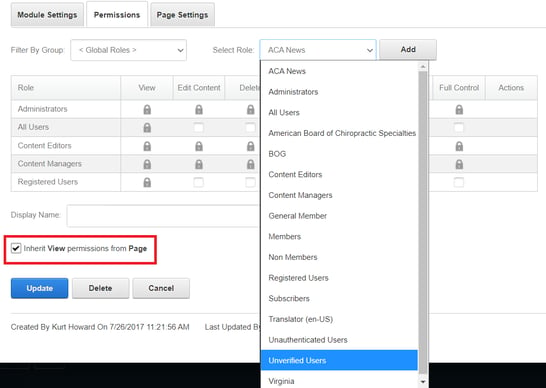
Content generally Inherits from the page it’s on, but you can override that so the content items on a page have separate permissions.
More information on securing files based on roles can be found in DNN Support.