
There are several letters you can use to communicate with exhibitors at your show. Under the main AMS Menu, Shows, select Exhibitor Communications.
The Booth Deposit, Booth Assignment and Booth Final letters are used to notify an exhibiting company of their booth status and payments as they move towards the show date. The General Letter and Labels may be used at any time for any communications with all of the Exhibitors for a show.
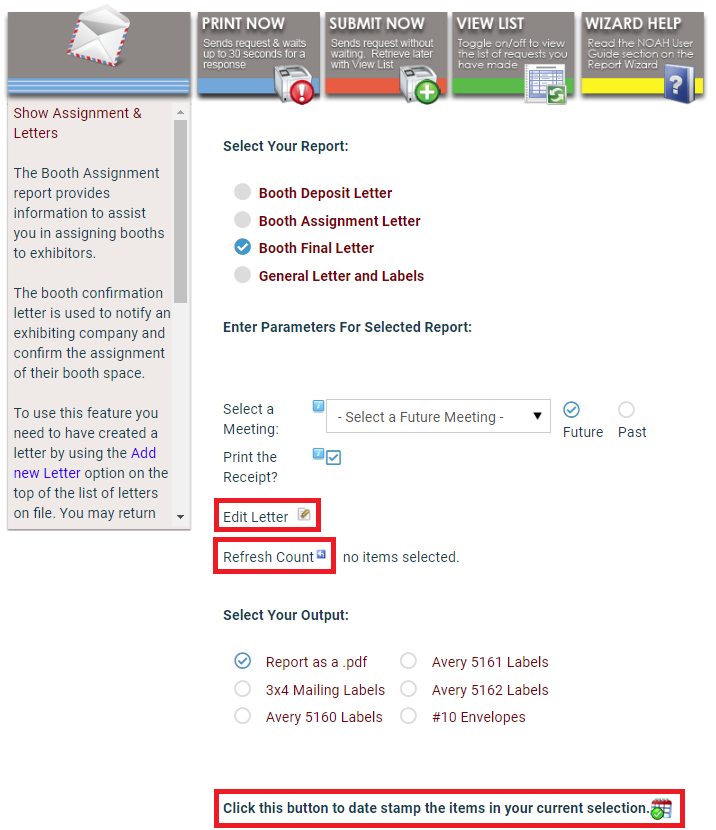
To print your letters select the Meeting the future or past from the radio-button list and elect to print the receipt or not.
You may edit the generated letter by clicking on the  edit icon next to Edit Letter. Each report listed has an associated letter that you may edit for your needs. The editor includes Custom Tokens so you may personalize the letter; you will probably want to edit this letter for each show.
Next click on the refresh icon next to Refresh Count to see how many letters are awaiting printing. Then select the paper stock, label or envelope output. Finally, click Print Now or Submit Now at the top to generate the report.
When finished with the deposit, assignment or final letter, click on the  calendar icon at the bottom of the page to date stamp the letters with the printing date. If not a test, the letters will use Date Stamps to ensure only one copy of letters are sent.