
The Conference Module is very configurable and can present different HotKeys to a registrant based on their information in the database. This is configured by JL Systems based on a client's specific needs. When creating HotKeys for Meetings, the last 5 characters of the HotKey will be used by the Conference Module to determine which HotKeys are shown to which users during the registration process. This is completely specific to your organization, thus your patterns are your own and have been previously configured in the business rules of your configuration. You must contact support if you wish to modify the patterns in use.
For trouble shooting purposes, to see how this has been configured in your Conference Module you can Inspect the page and add some code in the Console to reveal the pattern being used for the attendee selected for registration. These instructions are for the Chrome browser.
- Login and go to the registration page on your website
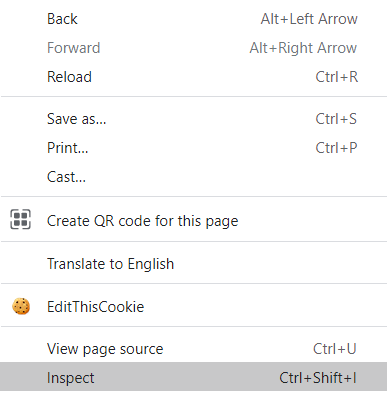
- In Chrome, right click on the page and choose Inspect to open the developer tools
- Under Console, there is a > where you can add commands.
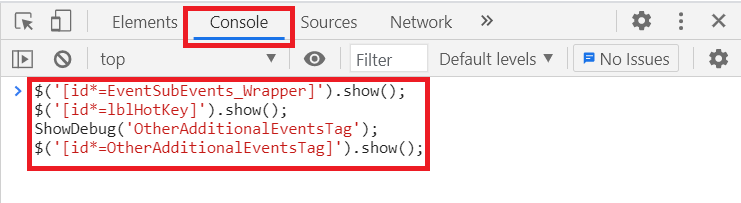
- Paste in the following commands:
$('[id*=EventSubEvents_Wrapper]').show();
$('[id*=lblHotKey]').show();
ShowDebug('OtherAdditionalEventsTag');
$('[id*=OtherAdditionalEventsTag]').show();
and hit enter. - Now navigate to the Registration tab and at the top the HotKey Pattern will be revealed.
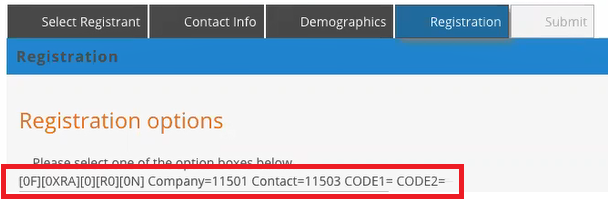
The [ ] brackets are showing what the Conference Module has been configured to look for in the last 5 positions of the HotKey. So in the screen shot above:
- Position 5 is 0 or F
- Position 4 is 0, X, R or A
- Position 3 is 0
- Position 2 is R or 0
- Position 1 is 0 or N
You can refer to the Event Program Codes to see what these values are used for, but this tells you what the Conference Module is looking for in your Event's HotKeys as registration options for the selected registrant. You can view different possibilities by selecting registrants that are members, non-members, or if your rules support it, members of a specific member type. For the module to work correctly, you will need to have the correct HotKeys created and the module needs to be looking for the related HotKeys to include them in your registration process.