
On an Inventory Item, clicking the Properties button will show you the categories this product can be found under.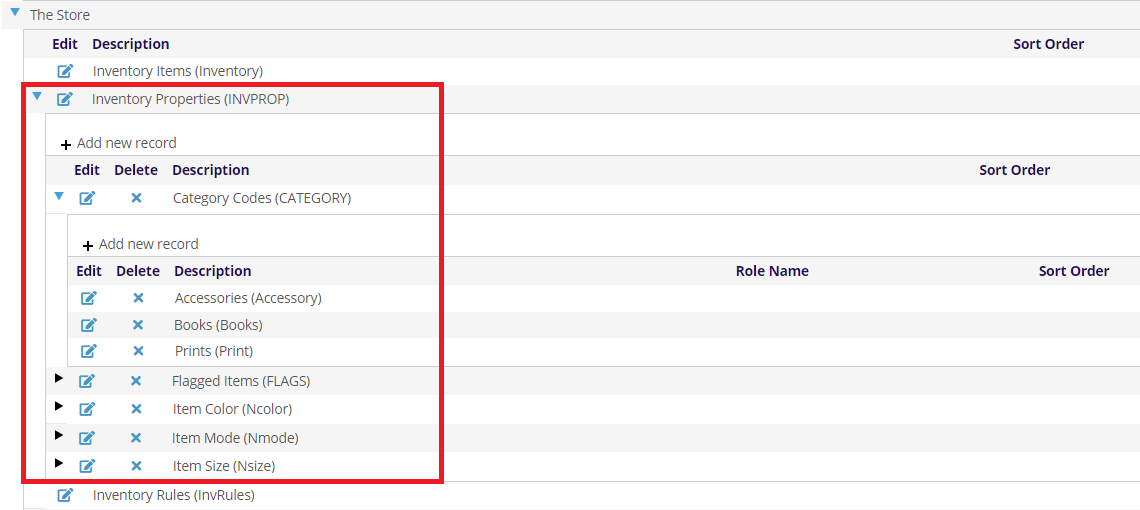
They control where this item can be found on your website. These Properties are found in the Dictionary under The Store, Inventory Properties (INVPROP).
In the example above, we have Properties for Category Codes and Flagged Items. Categories describe the type of item, like a book or a print. Whereas Featured Items are for new or sale items. You can have as many as you like, and items can have as many Properties as you like.
These can be used on your website to help users find items, or to highlight new or sale items.
To add other Properties, click the + Add new record at the top left of the grid. To edit and existing Properties, click the  edit icon on the left side of the grid next to the property you want to edit.
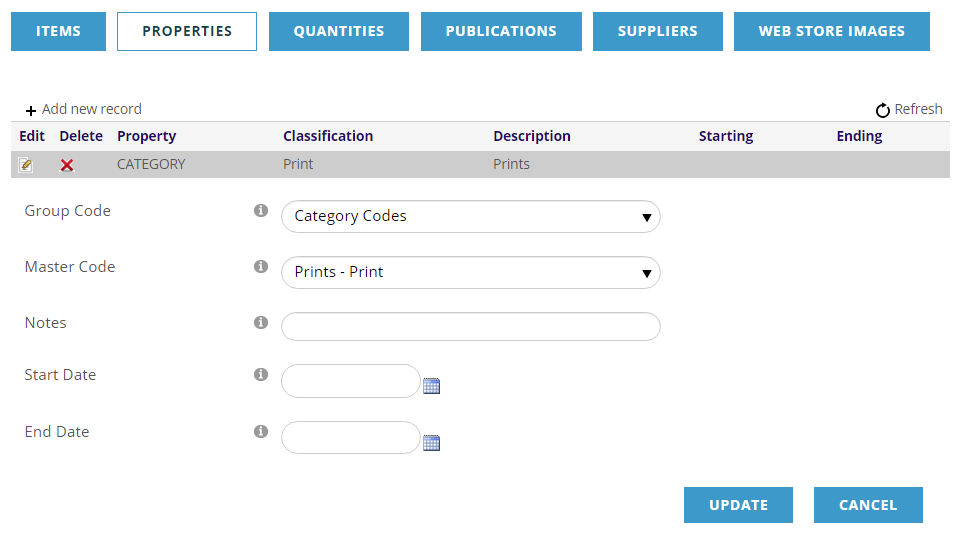
The Group Code and Master Code options align with the Inventory Properties (INVPROP) defined in the dictionary.
Notes is an internal field for any staff notes about this property.
The Start Date and End Date can be use to determine when this Item has this property. For example, you might want a item flagged as New for the next 2 months, or you might want a Sale item to only be highlighted for the last to weeks of the month.
Click UPDATE to save your changes, or CANCEL, when you are done.
NCOLOR, NSIZE & NMODE are specific Group Codes used in the Store to sell items with different colors, sizes and/or modes available; for example, t-shirts may be sold in various sizes and colors. See Selling Inventory Items with Sizes and Colors for more information.