
The Matrix Information section is where you can add text an images to show with your Matrix. This Information is related to a Page, so first you should select the Page you want to add/edit this Information.
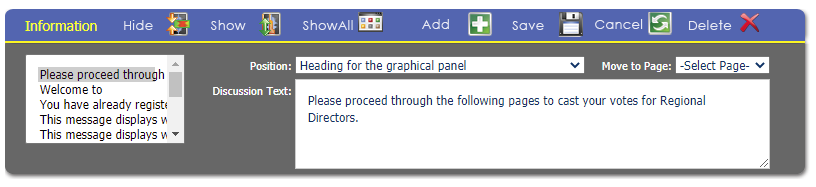
On the left, you will see the Information items that are already configured. Click the  white and green plus button to add a new Information, or click on the Information on the left that you want to view/update. NOTE: make sure you save your changes using the
 Save button in the Information area (not in another area) before moving to a different Information item or your changes will be lost. To delete a Information, use the
 red x button on the right. You site's Skin can affect how and where these items display.
There are three areas to define the Information:
- Position- this is where you pick from predefined areas the Information you want to display.
- 1st Photograph or image to display
- 2nd Photograph or image to display
- 3rd Photograph or image to display
- 4th Photograph or image to display
- 5th Photograph or image to display
- 6th Photograph or image to display
- 7th Photograph or image to display
- 8th Photograph or image to display
- 9th Photograph or image to display
- Already registered Home Page help panel on the left side of the page- this messages displays when the person is already registered.
- Confirmation panel being displayed- this message displays when the Confirmation badge/receipt panel is open
- First Home Page help panel on the left side of the page
- Heading for the graphical panel- generally displayed to the left of questions, the panel has a heading that displays at the top.
- Help User Guide being displayed- this message displays when the Help User Guide is open.
- Marketing Information pane- this is the main info panel
- Other Contact Selected Home Page help panel on the left side of the page
- Page heading text prior to all questions- a heading that generally displayed above questions.
- Path to the course
- Picture to display on the graphical panel- this is the URL to the logo to display on the panel. generally to the left of questions and below the Heading for the graphical panel.
- Session Rules. Place on first page
- SKIN file name to use on this page
- Sub-heading for the graphical panel
- Text for the picture on the graphical panel- This text generally displays below the Picture to display on the graphical panel.
- The discussion panel at the bottom of the page
- The help panel on the left side of the page
- The main panel as a recommendation
- The text to display when the correct answer is selected & The text to display when the incorrect answer is selected- These are used when the Summary Grid and/or Final Grid from the Matrix Setup are set to Question and Response and Correct/Wrong Discussion Text, and is what is shown based on if the correct answer has been selected or not.
- Discussion Text- this will be the text, HTML Code, or URLs for the selected Position. This is a very large field, so you should not reach a size limit.
- Move to Page- use this to move the selected Information item to a different page.