
There are three ways to get to the Contact home page when you are logged into the AMS.
- When you first log in, select Contacts, Profiles after hovering over the button that opens the AMS Main Menu.

- Click on the Profiles button; the first of the group of buttons at the right top of the screen.

- Click on the Search option in the Profile Navigation Toolbar.

Note that once you view any contact record, the first two options will bring you to that contact’s Summary page rather than the Contacts/Profiles landing page. Use the third option if you need to search for another contact record after viewing, editing or creating one.
The Contacts/Profiles landing page is in the following screen shot. The three tasks you can begin from this screen are: 1) to search for an existing contact that you need to view and/or edit, 2) to create an individual contact and 3) to add a company or organization contact record, and be led if necessary through the optional additional process of creating sub-organizations and individuals linked to the organization.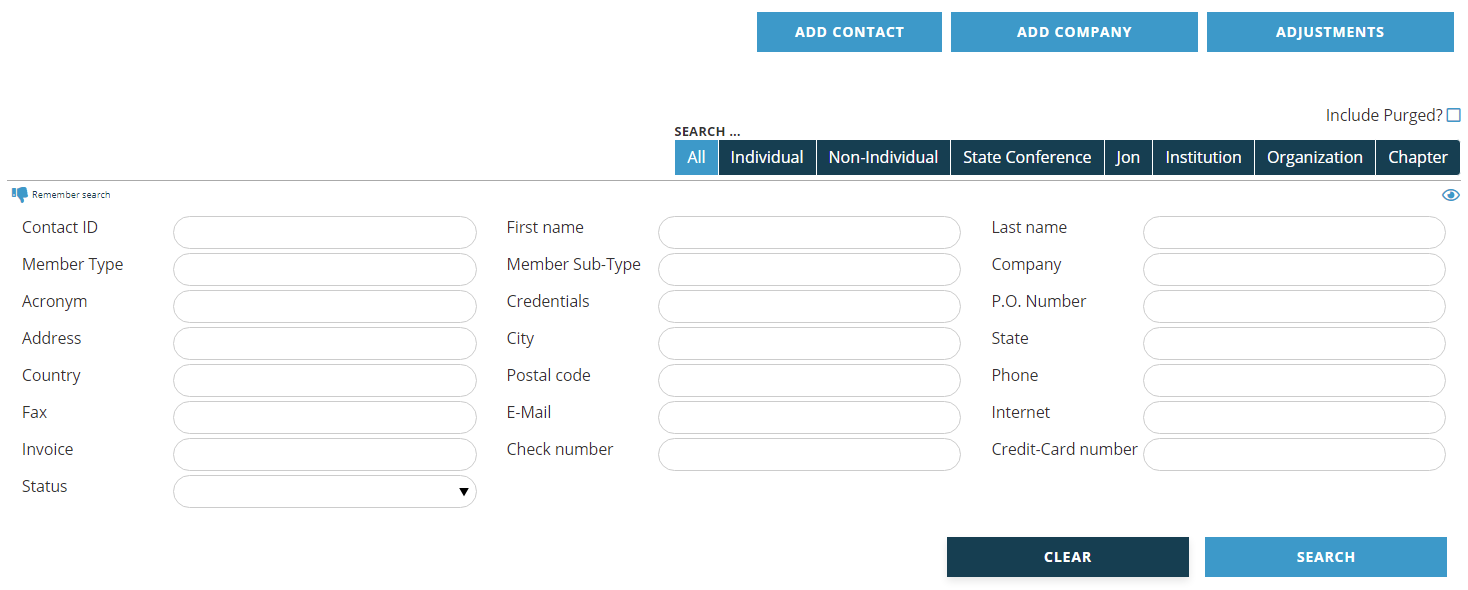
The buttons used to Add Contact and Add Company records, remain available at the top of the Profile Header after you select or create a contact record. The Adjustments button opens the Adjustment Wizard.